
STA (RF version) – Torque and Angle Control
What is required
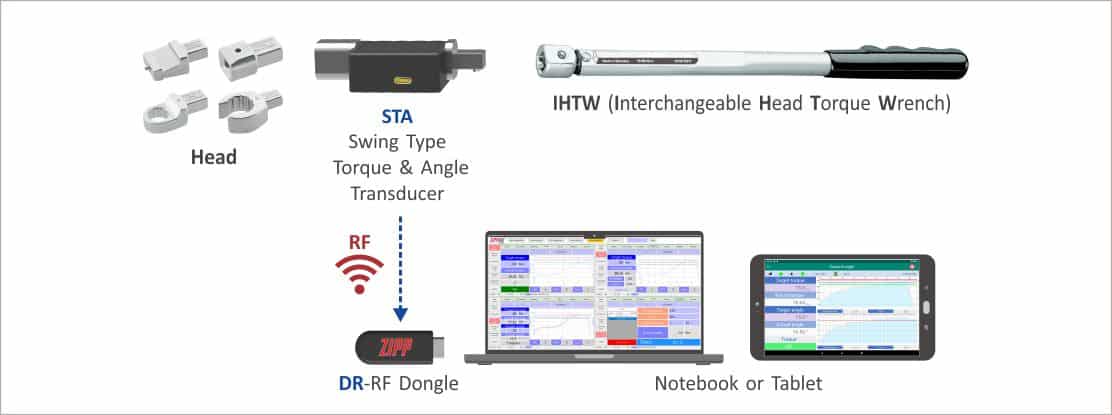 System
Architecture
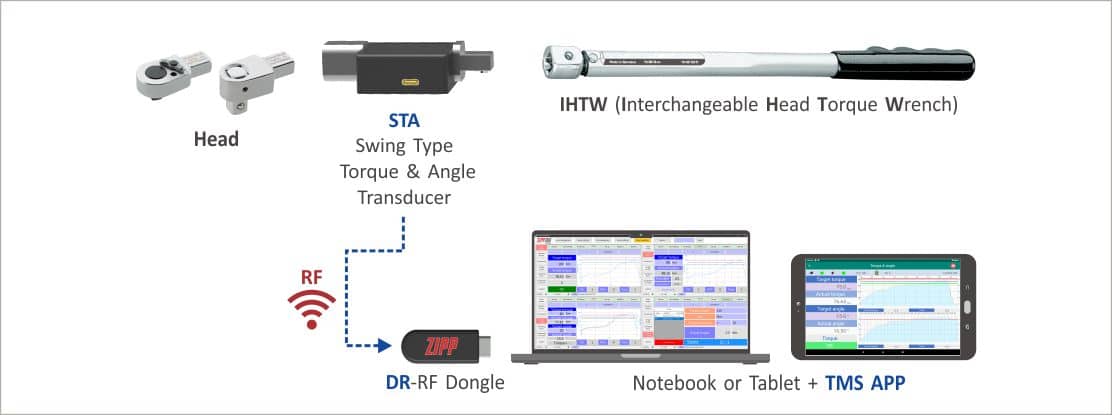
Procedures
- Insert the Dongle into the Notebook or Tablet.
- Open the TMS software.
- Set the Dongle port.
- Enter STA mode, then press the “Setup” button to open the “Setup” page.
- Select the combination code.
- Please follow the combination shown in the tool combination code to complete the tool combination (headset with STA and an interchangeable head torque wrench) in the order shown.
- Turn on the STA transducer power.
- Select the STA transducer you want to use (the same tool combination setting must be used).
- Select the working mode <Torque + Angle>.
- Set the inspection conditions and accuracy.
- Return to the work page.
- Set the initial target torque.
- Set the final target torque.
- Set the target angle.
- Start bolting.
- Release the STA after bolting to the target torque prompted by the system.
- Start bolting again and release STA once the target angle is reached.
- QC judgment.
- The system completes the work record (operator ID, date & time, target torque, actual torque, QC result, and tool combination code).