
STA (RF version)-Torque and Angle Calibration
What is required
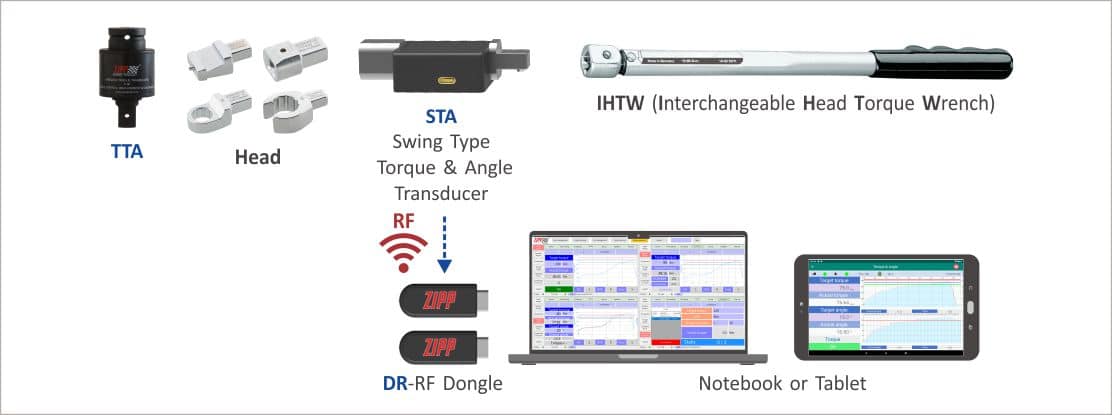 System Architecture
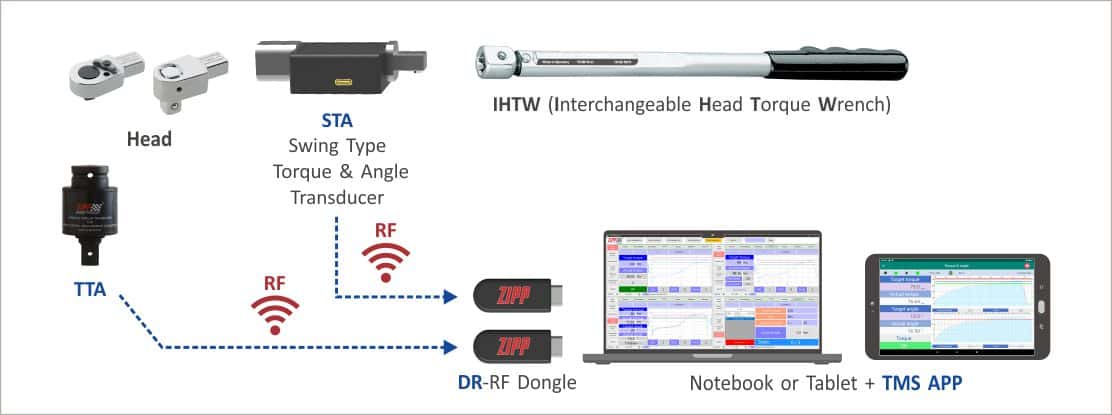
Procedures
- Assemble the HEAD with STA & Interchangeable Head Torque Wrench.
- Insert the two Dongles into the NB separately.
- Open the TMS APP software.
- Set up the TTA Dongle & STA Dongle ports respectively.
- After setting, complete the pairing of TTA and STA, then turn on TTA and STA.
- Continue to press the “Torque Correction” button to enter the “Torque Correction” page.
- In the TMS APP, select STA mode to open the settings page, then select the STA model you want to use.
- In the TMS APP, select STA mode to open the settings page, then select the TTA model you want to use.
- Press the “Add” button and enter the tool combination number & name, Head number, and torque wrench number. The system automatically catches the STA number in the connection.
- Set the target torque.
- Insert the assembled STA wrench into the TTA, then attach the socket and begin tightening the bolt.
- Stop tightening when the TTA indicates that the target torque has been reached.
- The system automatically enters the static torque values for TTA and STA into the corresponding form fields in the software to complete the torque calibration.
- After the system completes torque correction, the operator needs to measure the torque arm length and enter the angle parameter, then press the “Save” button to complete the angle calibration.